Sunday, May 23, 2010

Flex Remoting with Java Part 2

In the last blog entry, I wrote about setting up a simple Flex Application and integrating it with Java so as to be able to make Remote Calls to Java Methods and display the result in Flex.

Today, we are going to make those efforts valuable by seeing how a user-defined object can be passed between Java & Flex. We will create a Employee List in Java and show it in a DataGrid in Flex. As Simple as that. To start with, you must have all the environment setup as explained here.

RPC with User Defined Objects

To be able to do so, we must create classes in both ActionScript and Java and bind them together as shown below:

Employee.java

EmployeeJava

Employee.as

EmployeeAS

The Java and the ActionScript file have the same attributes and they map to each other using Flex Metadata: RemoteClass(alias=””) which maps the java object returned from server to ActionScript object which can be displayed. This metadata tag used in ActionScript Class (Employee.as) specifies the fully qualified name of the corresponding Java Class. We now create a Utility class for getting Employee details:

EmployeeUtils.java

EmployeeUtils

Here, we have hard-coded the Employees Data, but it is as easy to get these employees from a database by firing a query. We now make a RPC call from Flex to get this list so that we can display it in a DataGrid.

getAllEmployees

We create a RemoteObject in Flex and specify a destination “employee” which is present in a remoting-config.xml to specify the Java Class file to look for methods called (getAllEmployees) using this RemoteObject. Part of flex-config.xml which specifies this looks like:

remotingConfig 

We specify the result and fault handlers with the remote object, which are called when result or fault occurs. In the result handler function, we save the result in a ArrayCollection, which we bind with our DataGrid as shown below:

employeeDatagrid

We set the dataProvider property of our DataGrid component to __employeeList, which is a bindable ArrayCollection which contains the result data. The advantage of making the ArrayCollection as bindable is that any changes made to this ArrayCllection (due to any event) is reflected in our DataGrid automatically.

When we run this example, we get a DataGrid as shown below:

output

Again this is not a best-way to code your flex application. The intent was to show how user-defined objects can be passed between Java & Flex. In practice and in large scale application, we would use tested frameworks like Cairngorm or PureMVC.

Wishing you very Happy Coding with Flex :-)

Wednesday, April 28, 2010

Flex Remoting with Java

Flex is one of those technologies that has taken the RIA (rich internet applications) world by storm and surprise. It has never been so easy to create interactive user interfaces before. Flex offers various ways to interact with languages like Java, PHP and Coldfusion:

  • RPC Services which enables Flex applications to make asynchronous calls to remote services following a call and response model.
  • Data Management Services provides data synchronization and real-time updates, on-demand data paging and many other data integration features to Flex Applications.
  • Message Services that provides Flex with a publish-subscribe mechanism to create rich and collaborative real-time applications

All these capabilities are provided as a part of Adobe’s LiveCycle Data Services Pack. But unlike the Flex SDK, the entire LiveCycle Data Services Pack is not free and open Source. Rather, Adobe has open sourced a part of it, basically the RPC services and Message Services known as BlazeDS.

Using the RPC Services, one can

  • Call and invoke remote Java Methods directly and bind the result to a Flex component. (using RemoteObject Component ). It follows a request and response model making asynchronous calls to the backend.
  • Invoke an already deployed SOAP-based Web Service over HTTP using WebService Component.
  • Send and receive data using HTTP GET and POST using HTTPService Component.

Today, we are going to make use of RemoteObject to invoke Java Methods and show the result in Flex. For this purpose, we are going to use

  1. Flex 3 SDK
  2. Flex Builder 3
  3. BlazeDS for making asynchronous calls to Java

Open Flex Builder. Create a new Java Project. Name it ‘testFlexRPC’.

Project Structure

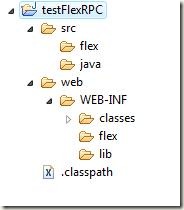
Structure of a typical flex application that we will use looks like:
projectStructure

web’ is our output folder. We will deploy it as a WAR file later on. The output folder contains the WEB-INF folder, in which we will add the deployment descriptor ‘web.xml’ file and other folders such as classes. (the path web/WEB-INF/classes should be your default output folder in Java Build Path, which will store the class files). Make two other folders, flex and lib which will contain the flex files for remoting purposes (remoting-config.xml and services-config.xml) and the libraries needed for Flex Remoting (typically the BlazeDS JARs for messaging).

Deployment Descriptor

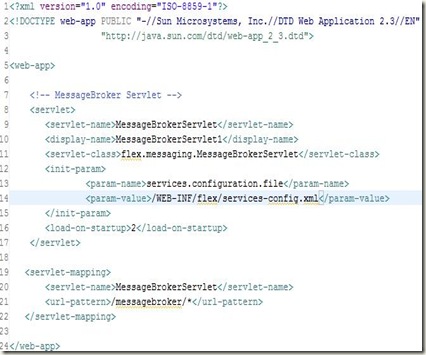
Lets add the deployment descriptor (web.xml) to the project. It will typically contain an entry for the MessageBroker Servlet (which is used by the flex framework for RPC communication) and specify the location of services-config.xml, which is used to define the kind of RPC services to be used.

web.xml
deploymentDescriptor

Services-Config.xml

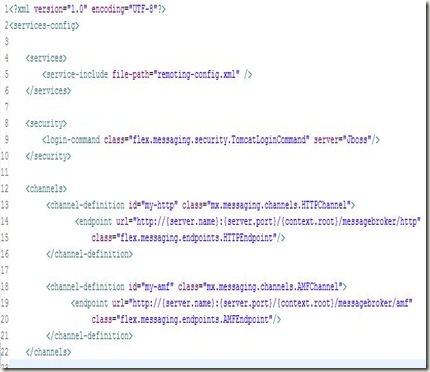
Line 14 of web.xml specifies the location of services-config.xml in your project. It is the top-level configuration file that contains security-constraint definitions, channel definitions, logging settings that each of the services can use. Create an empty XML file on that location and add the following to it:
servicesConfig1

Firstly, it defines the kind of RPC services that we will use in this project. It includes another file: remoting-config.xml which will contain the destinations for RPC Calls.

Next, it defines the channels that are actually used by the flex application to transfer data between client and server. It defines two channels: HTTP channel and AMF Channel (AMF stands for Actionscript Messaging Format). These channels are used in remoting-config.xml as we will see in a moment. These channels are a key element of the destinations that are specified and perform all work needed for the asynchronous communication that is required by the application.

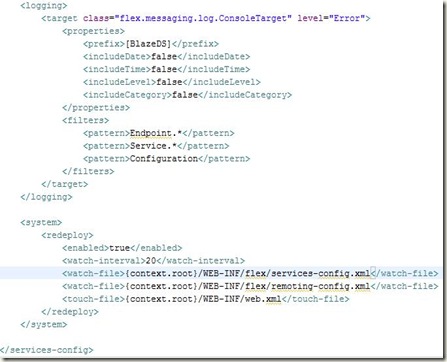
The other part of this file: services-config.xml specifies the logging information and looks like:
servicesConfig2

Remoting-Config.xml

Lets create another XML file, which will list the destinations that we will make use of, for making asynchronous calls to remote Java methods from Flex.

remotingConfig

It specifies the channels (HTTP and AMF that we configured in services-config.xml) that these destinations will use to communicate between client and server. This file also lists the adapter (server-side code) that interacts directly with the object or the service.

Next, it defines the destinations that can be used with <mx:RemoteObject>, <mx:WebService> and <mx:WebService> tags in MXML or its equivalent in Actionscript code.

Here, we define a destination (sayHelloToMe) and bind it with the Java Class SayHello.java present in java.myPackage package.

Now, add the following libraries in your project. You can find them in the BlazeDS zipped file that you downloaded at the start.

libraries

Now, right click on the project node and go to Flex Project Nature –> Add Flex Project Nature

A popup would appear asking for Flex Project Settings. Choose the default settings: application server type to J2EE and check the box Using remote object access service. Click Next to configure J2EE server for your application
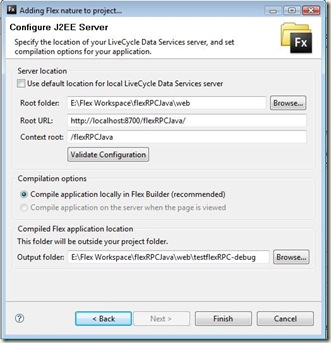
flexProjectNature

Enter your application deployment settings like your application server’s port number and the context root that you want for this application. Also specify the output folder, where you want the resulting SWF file (and the html wrapper) to be stored. Click Finish to successfully add the Flex Project Nature to your Java application.

It will automatically create a default MXML application file with the same name as the project to the source folder (configurable in Flex Build Path). We move this mxml file to flex folder that we created under src/flex folder (not necessarily needed, but we have a thing for being organized :-) ). Though for this, we also have to change the Flex Build Path. So, right click on the project node, go to properties. Click on Flex Build Path tab and set the following settings:

Click Add Folder and add “src”. Also change the main source folder from “src” to “src/flex”. Click Ok to update the compiler settings. You still need to set the testFlexRPC.mxml as the default mxml application. so, right click Project node, go to Properties, Go to tab Flex Application. click on Flex folder and click add. Now add the testFlexRPC.mxml file and click set on default button to make it default application file.

If you check out, the project must be giving you a compile-time error since we have not created any html file (wrapper) to embed the SWF file which contains the compiled flex application. So right click on the error and click ‘Re-create HTML Templates’ to create the default html wrapper which can be used as is.

Now, your application is ready to be deployed (technically), but since we have not added any display element and made use of Flex Remoting (the long and tiring process that we have done so far), so there is no use of deploying it currently.

Now, comes the easy part. Click the src/java and add a new package: mypackage and create a new Java File: SayHello.java ( as specified in remoting-config.xml ) It looks like the following:

SayHello.java

SayHelloToMe

Now, this is a very simple example (because I think you already have had enough !!) and this is not something for which you have to go to Java from Flex. But it is enough to show you how things can be done and results calculated in Java can be passed to Flex (whether its a primitive or any other object: String or any user-defined object as well)

Now, we will call this java Method in Flex. Add the following code in testFlexRPC.mxml file, already created.

testFlexRPC.mxml

ApplicationMXML

Again, this is not a best-practice way to code, but since I’m running out of space and you are running out of patience, so I’m doing things quickly :-)

Finally, we are ready for deployment and I’m using Tomcat to deploy my web application. To accomplish this, we create the following XML file specifying the context.

flexRPCJava.xml

flexRPCJavaXML

To learn more on how to deploy Web Applications on Tomcat, please read my previous blog entry about the same.

Now, all you need to do is to start Tomcat and check whether your application is working correctly or not by checking the HTML wrapper that Flex Builder created for you:

output

I hope you are with me till now and would be happy to know that this (perhaps the longest blog I ever wrote) has finished and you have successfully learned how to use Flex with Java.

I could have taught the same in a very concise manner using the BlazeDS Turnkey Server and pre-configured examples, but that would have defeated the purpose of structuring and creating a web-application from scratch. Hope you had fun. Cheers !!

Any suggestions, corrections or Comments are welcome and wanted :-)

Wednesday, March 24, 2010

Singletons, Threads & Double Checked Locking

This blog entry extends on the first entry I wrote about Singletons. Today I try to explain the usage of Singletons in a multi-threaded environment.

A typical Singleton would look like the following:

MySingletonJava

This Singleton class would work perfectly fine in a single-threaded environment. But, how many Java based applications that you have worked on, are single-threaded? None, perhaps.

Can you see what’s terribly wrong with it when your application has multiple threads running simultaneously ??

Well, the answer lies in the way the instance is lazy initialized. The null-checking and initializing the instance need to be an atomic operation. Lets see what would happen if following sequence of events happen:

  • Thead A calls getInstance() for the first time. And checks whether instance is null or not. It finds it true and goes to execute line 11.
  • At this point, it is pre-empted by another thread: Thread B, which also calls getInstance(), checks for the instance null check, since it is not yet initialized, the private constructor is called and instance is now initialized with a state.
  • Thread A resumes control back and starts from where it left i.e line 11. Now the real problem occurs. Since it checked for the null-check on line 10 when it last run and found it to be true, so when it resumes execution, it will execute from line 11 and again initialize the instance and hence two objects would be created and the whole point of having a single object is violated.

Thus, we really need to do something about the situation. No problems, Synchronization comes to the rescue. Most of us (naive programmers) would tend to get rid of this problem by writing code like below:

MySynchronizedSingletonJava

The only change that occurs here is that we have made our static factory as synchronized method, which makes sure that no possible combination of interleaving of threads could create two objects like it did in the previous case. Although, this works fine but on close inspection, we find that synchronization is necessary only for the first time, and not needed later on (since instance will always be non-null later on) And synchronizing the whole method is thus uncalled for and pretty expensive. We must think of other ways of accomplishing this.

1. Do Not Lazy Initialize

If we do NOT need lazy initialization of the resource, then a perfect method to do away with synchronization would be:

Singleton1Java

Using this, we depend on the JVM’s capability to execute the static block as soon as the class is loaded first (when it is accessed or referred in code).

Thus, the VM makes sure that the instance is well initialized, before any thread tries to call getInstance() method. And since static blocks are executed only once, so no chance of creating more objects. One scenario that I could fail this approach is when this class is loaded again (perhaps by a different classloader in a different namespace)

Another way to write the above code would be:

Singleton2Java

However, I prefer the first way (with static blocks) that gives us more flexibility by allowing us to write a block of code instead of just calling the constructor.

2. Use Double Checked Locking

A very common, popular and misunderstood programming idiom that looks like the following and works with Java 1.5 and above only.

Singleton3Java

See how cleverly, we have limited the scope of synchronization here. The synchronization occurs only for the first time (when the instance is null), after that the synchronization never occurs as the instance is not null. This is what we needed. But you must make this variable as volatile to work it correctly (due to Java Memory Model implementation)

To better understand this programming idiom, I would suggest reading this and this.

I think its enough for one blog post. Any code corrections, new ideas and comments are welcome.

Saturday, February 27, 2010

Creating Immutable Objects in Java

Immutable Objects are those objects, who cannot change their STATE once they are created. Most common examples of such objects are String, Integer, Double etc.. (other Wrapper classes). By State, we mean the values assigned to the instance variables of the object in question.

Immutable Classes are one of the most robust classes that you can ever build and the reasons that we love them are:

  • They are Thread-safe, hence no need to synchronize them for concurrent access.
  • They are Easy to construct, test and use
  • They Serve as good Map and Set keys
  • If such an object throws an exception, it is never left in undesirable or inconsistent state.

Strategy to Construct Immutable Objects

If we follow the following steps, we can easily create Immutable objects or convert an existing Mutable class into Immutable:

  • Since we have to restrict our object to change its state once they are created, we must not provide any setter methods.
  • If a object has references to other mutable objects, then do not provide getter methods that simply return a reference to the mutable object. Rather, create a new object containing the copy of the mutable object.
  • Don't allow any subclass to override methods of the given class. This can be done by making the class as final. Another way is to make the constructor as private and provide factory methods to construct the object.
  • Make all the fields private and final. This way only your class has  the control how these fields are to be manipulated.

Person1

  • Also, do not provide any other methods that modify the object. In case you have to, then do not modify the existing object, rather create a copy of the original object, modify it and return the modified object.
  • Construct the whole object in one go, initialize the whole object (assign values to all the instance variables) while creating the object.

Person2

One may argue that immutable objects calls for creation of unnecessary objects every now and then, for example if we do

Person3

then a new String is created and the original string is not modified. For argument sake, we have 3 Strings created here. viz. “Agraj”, “ Mangal” and “Agraj Mangal”.

But this so-called shortcoming is taken care of by the Garbage Collector in Java, which marks any dead object for Garbage Collection (any object which has no active reference to it in any thread of execution)